Showing posts with label Tips. Show all posts

Tuesday, October 16, 2018

TIP: Can we get a list of SAP customer modifications?

SAP provides us with fixes to SAP code through OSS notes that we implement. During upgrades we make changes to code using SPAU. There are various reasons why customers make modifications but how do we list them so we can see what we have done?
Use transaction SE16 and table SMODILOG to view the modifications. The diagram below shows details like the object that was changed, the user that changed it and the transport request that it was in. It will also list the applicable OSS number if it was done via that method.

Tuesday, October 9, 2018

TIP: How do you set a start transaction for a user - or all users

Some users are always in one or 2 transactions... Why not fire up their most key transaction automatically each time they log on?
To do this execute report ADMIN_SET_START_TRANSACTION_FO
It has the following selection screen:
Simply execute and the next time user KWILSON logs in the transaction "/SAPTRX/EH_LIST" will be started.

Thursday, October 4, 2018

TIP: Searching for text in SAP programs

We often want to find programs where a certain text string exists. i.e. We know it contains a certain word but forgot the program name. Use report AFX_CODE_SCANNER to search for text within objects. 
The report can search the following objects:
  • Programs
  • Function groups
  • Classes
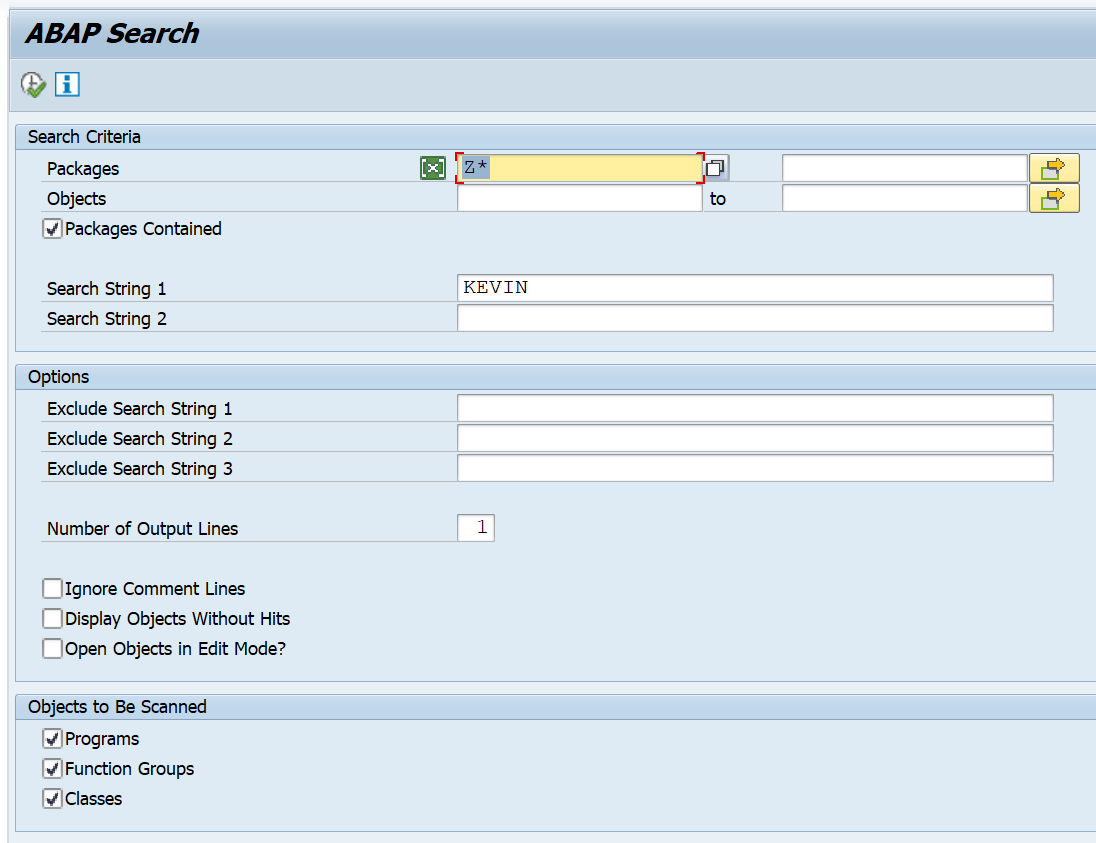
It has the following selection screen:
In the above selection I would be looking for all custom programs with my name in it...
And the result would look like this:
Double-clicking the row would take you to the applicable program.

Tuesday, October 2, 2018

Thursday, September 27, 2018

TIP: Listing background jobs by their frequency

Use report BTCAUX14 to view the following:

  1. Scheduling Frequency
  2. Number of times it's been run for the selected period
  3. How many instances are in released status
  4. How many are currently active 
  5. How many instances have been completed for the selected period
  6. How many were terminated
  7. Total Job Runtime
  8. Average Job Runtime
  9. Total Delay
  10. Average Delay


Wednesday, September 26, 2018

TIP: Changing background jobs in mass

We sometimes have a requirement to change several background jobs with the same change. E.g. You want to use a new user to execute a program or you have standardized the names of certain program and want to change the old program to the new program name. Well it is possible...
Report BTC_MASS_JOB_CHANGE can be executed to change jobs in mass.
This report allows you to change the following:

  • program / variant
  • user owner / step user
  • target server / group

There is a “Test Mode” option to test out the change prior to executing it for real

Wednesday, April 12, 2017

SAP GUI Controls

Shortcut Description
.abc Fast path: 'abc' refers to the underlined letters in the menus.
/h (/hs) Debugging mode (System funct.)
/i Terminates the current session (corresponds to System End)
/i1, /i2, ... Terminates the session with the number given.
/n Terminates the transaction (corresponds to pressing F15 (=SHIFT-F3) to go back).
/nend Terminates all separate sessions and logs off (corresponds to System - Logoff
/nex Terminates all separate sessions and logs off immediately (without any warning!).
/nxyz Terminates current transaction, and starts transaction xzy
/o Lists existing sessions and allows deletion or opening of a new session.
/oxyz Opens a new session and starts transaction xzy in the session.
SHIFT '*' New Session