Showing posts with label Tips and Tricks. Show all posts

Tuesday, October 16, 2018

TIP: Can we get a list of SAP customer modifications?

SAP provides us with fixes to SAP code through OSS notes that we implement. During upgrades we make changes to code using SPAU. There are various reasons why customers make modifications but how do we list them so we can see what we have done?
Use transaction SE16 and table SMODILOG to view the modifications. The diagram below shows details like the object that was changed, the user that changed it and the transport request that it was in. It will also list the applicable OSS number if it was done via that method.

Tuesday, October 9, 2018

TIP: How do you set a start transaction for a user - or all users

Some users are always in one or 2 transactions... Why not fire up their most key transaction automatically each time they log on?
To do this execute report ADMIN_SET_START_TRANSACTION_FO
It has the following selection screen:
Simply execute and the next time user KWILSON logs in the transaction "/SAPTRX/EH_LIST" will be started.

Thursday, October 4, 2018

TIP: Searching for text in SAP programs

We often want to find programs where a certain text string exists. i.e. We know it contains a certain word but forgot the program name. Use report AFX_CODE_SCANNER to search for text within objects. 
The report can search the following objects:
  • Programs
  • Function groups
  • Classes
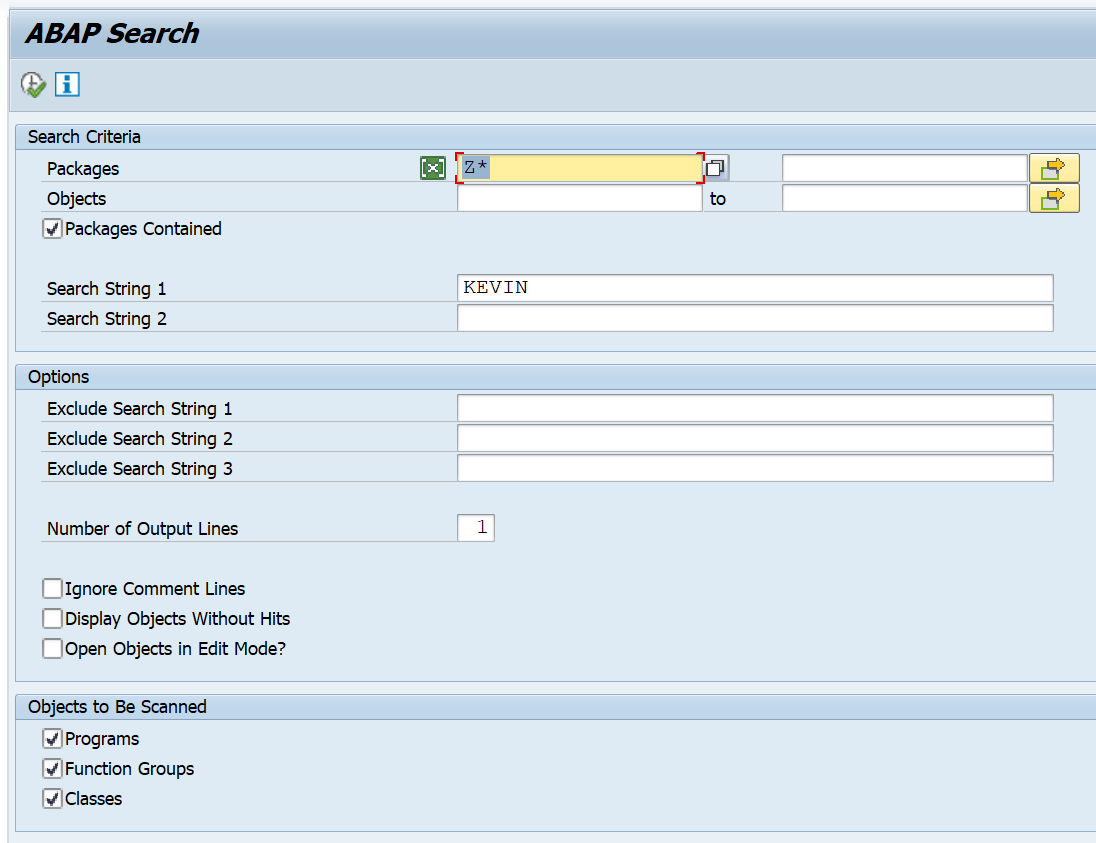
It has the following selection screen:
In the above selection I would be looking for all custom programs with my name in it...
And the result would look like this:
Double-clicking the row would take you to the applicable program.

Tuesday, October 2, 2018

Thursday, September 27, 2018

TIP: Listing background jobs by their frequency

Use report BTCAUX14 to view the following:

  1. Scheduling Frequency
  2. Number of times it's been run for the selected period
  3. How many instances are in released status
  4. How many are currently active 
  5. How many instances have been completed for the selected period
  6. How many were terminated
  7. Total Job Runtime
  8. Average Job Runtime
  9. Total Delay
  10. Average Delay


Wednesday, September 26, 2018

TIP: Changing background jobs in mass

We sometimes have a requirement to change several background jobs with the same change. E.g. You want to use a new user to execute a program or you have standardized the names of certain program and want to change the old program to the new program name. Well it is possible...
Report BTC_MASS_JOB_CHANGE can be executed to change jobs in mass.
This report allows you to change the following:

  • program / variant
  • user owner / step user
  • target server / group

There is a “Test Mode” option to test out the change prior to executing it for real

Saturday, October 7, 2017

SAP EM Knowledge Bites 12 - Troubleshooting tips

In our last blog we described the various Web Services that you can use to interact with SAP Event Management. Now let’s look in to SAP EM troubleshooting and providing some tips. Please feel free to add your own comments to keep a running list of tips and tricks…

Monday, September 18, 2017

Thursday, September 14, 2017

SAP EM TIP: Post-Processing Activity in Rule Set

With SAP EM 9.2 SP06 a new activity type “Post Processing Activity” has been introduced. It can be used to execute certain activities once instead of multiple times when processing event messages.

Only one post processing activity can be assigned to each rule set and it will be executed exactly once after rule set processing is done. This allows the EM developer to trigger follow-up activities in a mass enabled way instead of triggering the single action possibly multiple times during rule set processing. To make this work rule set activities which are executed during the rule set processing have to collect all data that is necessary for the post processing activity instead of triggering the actions itself. Check in this SAP document to see how to do it: Post Processing Activity to boost performance of EM – TM integration

Thursday, September 22, 2016

TIP: Comparing differences in code between 2 programs

Fire up transaction SE39. Enter your 2 ABAP program names, 1 on the left and 1 on the right, then press enter. You will see the 2 programs in the split screen editor. Now select the “Compare” icon (Ctrl+Shift+F11). The system will show you the different lines in the code by highlighting them in blue. (Press Ctrl+Shift+F10 to see the next difference.)
Note: You can also use this transaction to connect to another system via RFC to compare code between systems.

Thursday, September 15, 2016

TIP: Correcting Delivery Status inconsistencies

Follow this procedure to correct inconsistencies between delivery items (LIPS) and item status (VBUP)

  • Execute report WS_CORR_LIPS_VBUP_0` to delete the delivery lines
  • Execute report RVDELSTA to update the delivery status

Se OSS note 79210 for the detail

Monday, August 29, 2016

TIP: Generate a Unique index for Parameter values in SAP EM


Problem Statement

SAP EM stores attribute values as name value pairs (called Parameters). There are certain instances where you need to hold multiple values for the same attribute / parameter. For example, a shipment event handler can be tracked using multiple tracking Numbers. And at a later stage some of the tracking numbers become obsolete and need to be removed from the event handler. In these scenarios, not knowing the right index to remove the applicable parameters becomes very difficult and inefficient in terms of performance.

Monday, June 20, 2016

SAP TIP - Debugging a pop-up window

When a pop-up (dialog box) appears and exits your debugging session it is a pain... There is a simple trick to switch on debugging once you reach a pop-up box. 

Do the following: Create a TXT file and save it on your desktop with the following command:

[Function]
Command=/H
Type=SystemCommand


If you want to activate debugging on a pop-up/dialog box, simply drag and drop the TXT file from your desktop onto the pop-up/dialog box in SAP. Next time you press enter you will be continue in your debugging session.

Saturday, August 1, 2015

TIP: List of Parameter IDs

Here is the great list of useful Parameter IDs. Parameter IDs allows users to set up defaults for most SAP fields that have a dropdown selection.  This is a great time saver to help to reduce the # of errors.


/SAPTRX/EE_MON_SEL    Display Monitor Fields
/SAPTRX/NOPERFPOPUP    Disable the performance warning for selections ('X')
/SDF/BT_ID    BusinessTransaction ID
AAT    Order type

Friday, July 31, 2015

TIPS: Basis tips and Tricks

Feel free to comment on new tips and tricks 
  •  In an R/3 screen, use %pc to download any TCode full page in any format you want.(.htm, .txt etc). Also use TCode /nSO21 to specify the default download location (this is very useful as saving all files to the sapworkdir can be little annoying at times)
  • Show Work Process usage over time by running SM50 -> List -> CPU. This shows CPU usage in minutes since startup. If all of your DIA WP's show time, then consider adding more.

Thursday, June 18, 2015

10 Tips for Reports and Data Sources in SAP Business ByDesign

Author: Dan Edelman, Senior SAP Business ByDesign Consultant at FMT Consultants
This blog is intended to provide some tips and tricks for creating custom reports or data sources in SAP Business ByDesign. It’s aimed at users that don’t have a reporting background, so if you’re used to building SQL-based reports, just bear with me. This isn’t an end-to-end guide from data source to report, but serves as a reference to use if you’re just getting started, or have gotten stuck trying to figure out how to do something.

Monday, June 1, 2015

TIP: Remove “Copy From” in Solman title

ISSUE: When copying a document in Solution Manager, the original title gets “Copy From” as a prefix as the new title. This can cause issues when the length of a document title approaches the limit of 64 characters. Relevant parts at the end of the title can get truncated.
 
SOLUTION: To solve this you can remove the prefix by following the instruction in SAP note – 1605780. This correction avoids the prefix and thus keeps the original title for the copied document.

Sunday, May 31, 2015

TIP: Deactivating the SAP menu or user menus

ISSUE: There may be a need to switch off the ability to see the standard SAP menu or the user menu. How can we accomplish that?

Friday, May 29, 2015

TIP: Debugging a popup window

Debugging a report is pretty simple but there is a trick to stopping a debug session when a popup window happens. If the popup window is a result of a message and you know the message number you can search and potentially put a break-point in the code but sometimes you can't do that. In order to stop the code at the popup window do the following:
  • Create and save a TXT file with the following text:
[Function] Command=/H Type=SystemCommand
  • Execute the program and when the popup happens you can drag and drop the TXT file on to the popup window in SAP. Continuing will launch you in to the debugger